Your Campaign Is Over. Why Stop Selling?
Finishing your crowdfunding campaign does not mean you have to stop generating sales. You may still have thousands of people discovering your game, customers who missed the original campaign, existing backers who want additional copies, and inventory from your production run that you would like to sell. Hive gives you a simple way to turn that continued interest into ongoing revenue.
With Hive's Clone Project feature, you can quickly turn your completed campaign into a new sales page for a 2nd Wave, late pledges, reprints, or remaining inventory, without building a traditional online store or starting another crowdfunding campaign. You keep the visual, campaign-style presentation customers are already familiar with, while creating a fresh project where you control the products, inventory, pricing, and shipping you want to offer.
The result is more than a place to sell leftover stock. It gives you a dedicated post-campaign sales channel built around the same product-focused experience that helped customers understand and buy your game in the first place, complete with campaign visuals, clearly structured pledge options, add-ons, and a streamlined checkout.
Create a Long-Term Revenue Channel
A crowdfunding campaign creates something extremely valuable: awareness, reviews, community, advertising data, search traffic, and thousands of people who may discover your product months, or even years, after the campaign has closed. Normally, much of that demand has nowhere to go.
A Post-Campaign Sales project gives that demand somewhere to convert. Share it from your website, social media, newsletters, advertisements, convention promotions, or older campaign pages and continue accepting orders for as long as you have products to sell.
This feature is ideal when:
- You want to keep accepting orders after fulfillment
Perfect for selling leftover stock, production overstock, or reprint inventory.
- You don’t want to run a new crowdfunding campaign
No need to set up new reward tiers or rewrite your entire project. You simply copy your existing one.
- You want higher conversion than traditional e-shops
Hive pages retain the structured, visual nature of a crowdfunding campaign, this format boosts buyer confidence and improves checkout covnversions.
- You want full control of stock
Limit items per SKU, keep tracking inventory, or hide items that are sold out.
How the Feature Works
When you clone a project, Hive creates a new empty project shell that copies only the layout and presentation of your original project.
Nothing is inserted automatically.
- No pledges.
- No add-ons.
- No SKUs.
- No shipping tables.
This gives you complete control to build a clean “2nd Wave” project exactly the way you want.
What is Copied When You Clone a Project
The following elements are copied:
- Project description
- Page sections and formatting
- Images, media, and visuals
- Custom HTML blocks
- Color settings and branding
This saves time while ensuring your new page instantly looks polished.
What Is Not Copied Automatically
You must assign or create the following manually:
1. Pledges
- You can copy Pledges from the original project or any other project you own
- You can create entirely new pledges designed for your 2nd Wave or retail offer
This flexibility allows you to tailor the new store to your exact inventory.
2. Add-ons
Add-ons work the same way — nothing is added automatically.
You decide whether to:
- Reuse add-ons from the original campaign
- Pull add-ons from another project
- Create new add-ons for bundles, leftover stock, or reprint items
3. SKUs (Optional but Recommended)
SKUs must be manually assigned.
You may:
- Reuse the SKUs from the original project
- Create new SKUs (e.g., for reprints, new stock, new packaging)
- Assign SKUs from different projects to track stock across waves
This is particularly useful to avoid stock conflicts between the original campaign and the 2nd Wave page.
4. Shipping Setup
Shipping does not get copied automatically. But, remember that in Hive you declare shipping rules as a company and then assign them to projects. As such it is very easy to:
- Reuse your original shipping tables (simply assign the existing shipping method to the new project)
- Create entirely new rates for reprints or overstock (remember you can easily download a shipping table from a shipping method, make some changes in an Excel or Google Sheets, and then upload it in a new shipping method!)
- Use flat-rate shipping if desired
How to Create a Clone (Step-by-Step)
Creating a Clone Project (Step-by-Step)
1. Go to your Projects
Navigate to the project you want to clone.
2. Click “Clone Project”
This option is available inside the Project Settings menu.
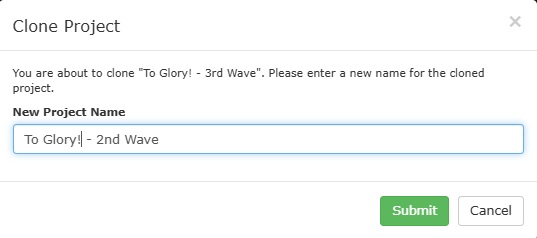
3. Name Your New Project
Most creators use:
- [Project Name] – 2nd Wave
- [Project Name] – Late Wave Retail
- [Project Name] – Reprint Store
4. Assign Pledges
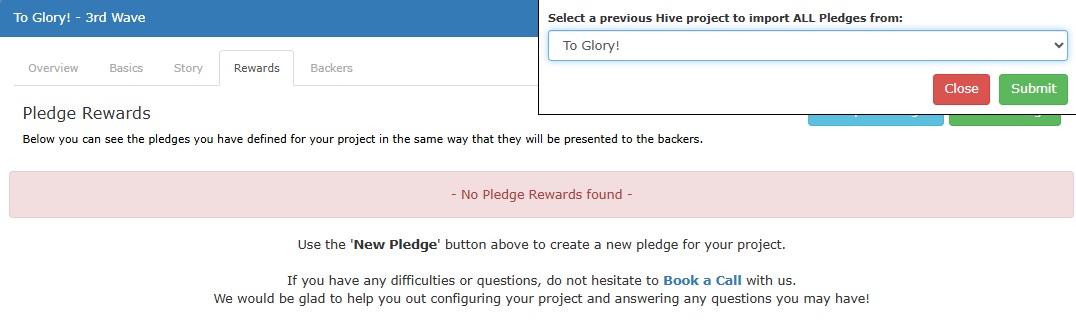
Go to Pledges and manually assign the pledges you want.
5. Assign Add-ons
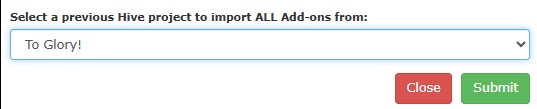
Select only the add-ons you want to offer during the 2nd Wave.
6. Assign SKUs
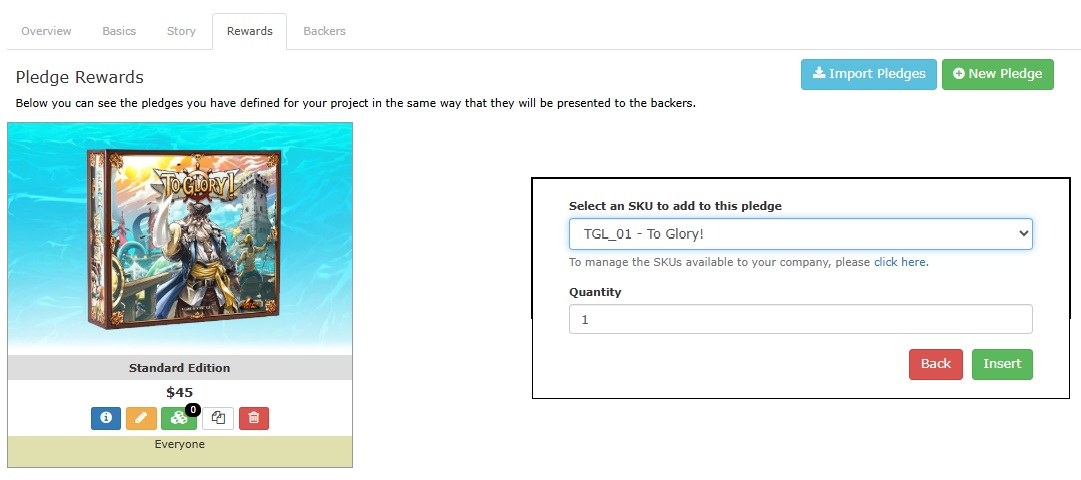
Connect the correct SKUs for inventory tracking.
7. Configure Shipping
Set up shipping rates appropriate for your new wave.
8. Publish
Once everything is ready, publish your project — it now acts as a high-conversion online store.
Best Practices
1. Use a Clear Name
Avoid confusing customers. Call it:
- 2nd Wave
- Late Wave
- Late Pledge Store
- Reprint & Overstock Sale
2. Hide Kickstarter-Exclusive Content
Make sure your 2nd wave does NOT include:
- Early Bird items
- Backer-exclusive bonuses
- Seasonal or time-limited offers
Unless they remain in stock and you choose to sell them.
3. Update Product Availability
If you have only 200 units left, set a stock limit for the corresponding SKU.
This prevents overselling and helps your customers act faster.
4. Make the Top of the Page Simple
You no longer need:
- Campaign updates
- Stretch goals
- Timelines
Instead, prioritize:
- Product description
- What’s included
- Clear price
- Shipping information
- A “Get it now” tone
5. Use Call-to-Action Buttons
Place “Get the Game” / “Buy Now” / “Choose Your Edition” prominently in the project description.
Tip: Pages that look too much like a Kickstarter update convert lower.
Pages that look like a premium product page convert higher.
6. Promote It Regularly
Post monthly or biweekly reminders that the game is still available for direct purchase.