Overview
In the Overview tab of your project you can get important information of the current state of your project, along with what you need to do advance to the next step.
Our platform can follow your project through every stage of your crowdfunding journey, providing the right tools to help in its step.
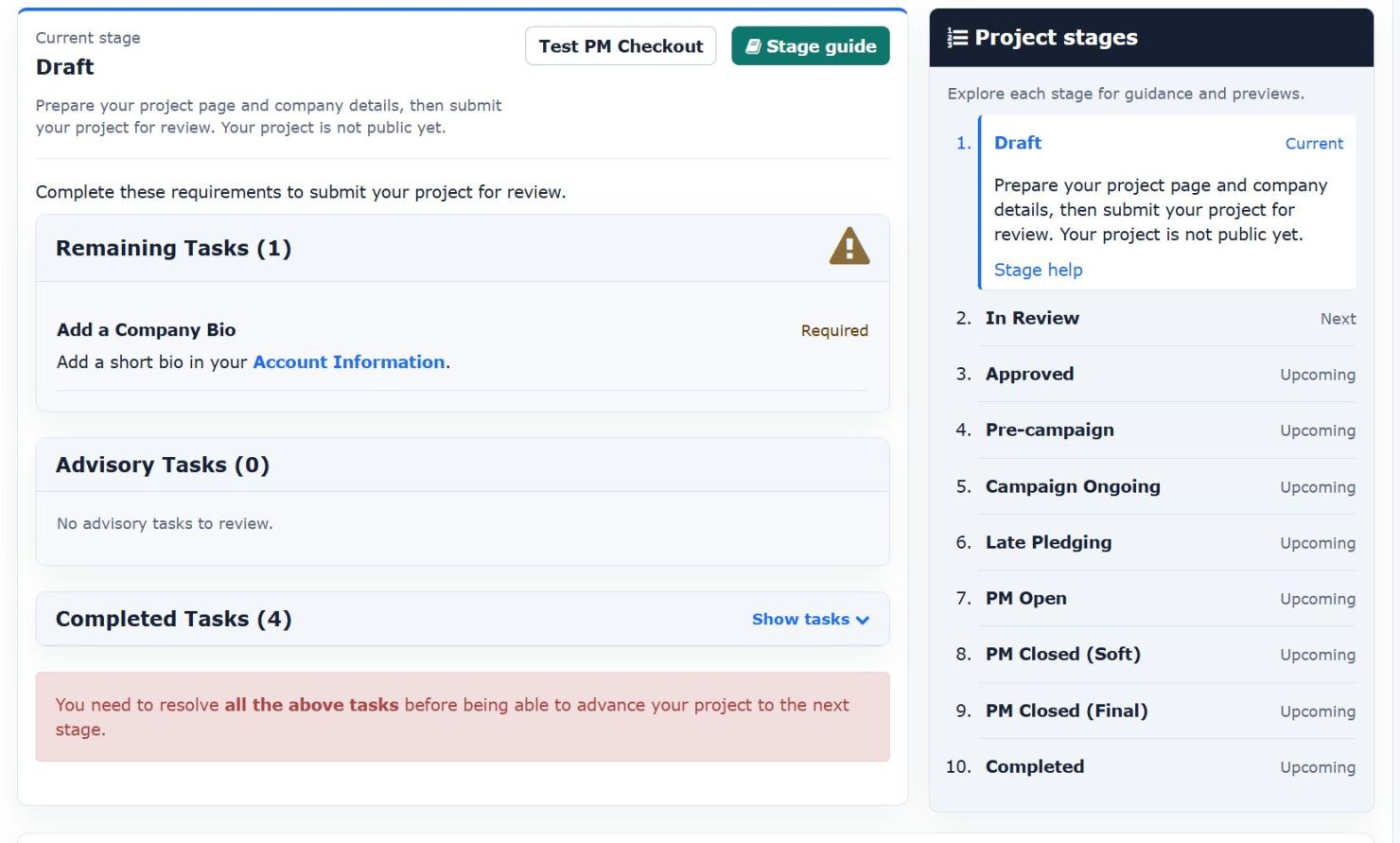
When you do not know what to do next, simply take a look at your "Project Checklist" in the "Overview" tab of your project, and our platform will guide you.
Clicking the "Stage Help" button within each state's panel, you will be directed to the relevant section in our Wiki that will give you more information about that specific state.
Clicking the "Preview" button within each state's panel, you will be directed to your project's main page in a mode where you can see and test how your project will behave when you reach that state. This mode is available only to you, and it should be used to test your project before advancing to the next stage.
Status: Draft
When you first create a new project in Hive, the project's initial status will be "Draft." During this stage, you have the flexibility to make changes to the basic information of the project and its story. You can utilize the "View Project" button to preview how the project will appear on our platform.
To progress to the next status and initiate the review process by our Support Team, follow the steps outlined in the "Project Checklist" located on the right side of the screen. The Project Checklist serves as your guide throughout your project's lifecycle, indicating the necessary actions at each stage.
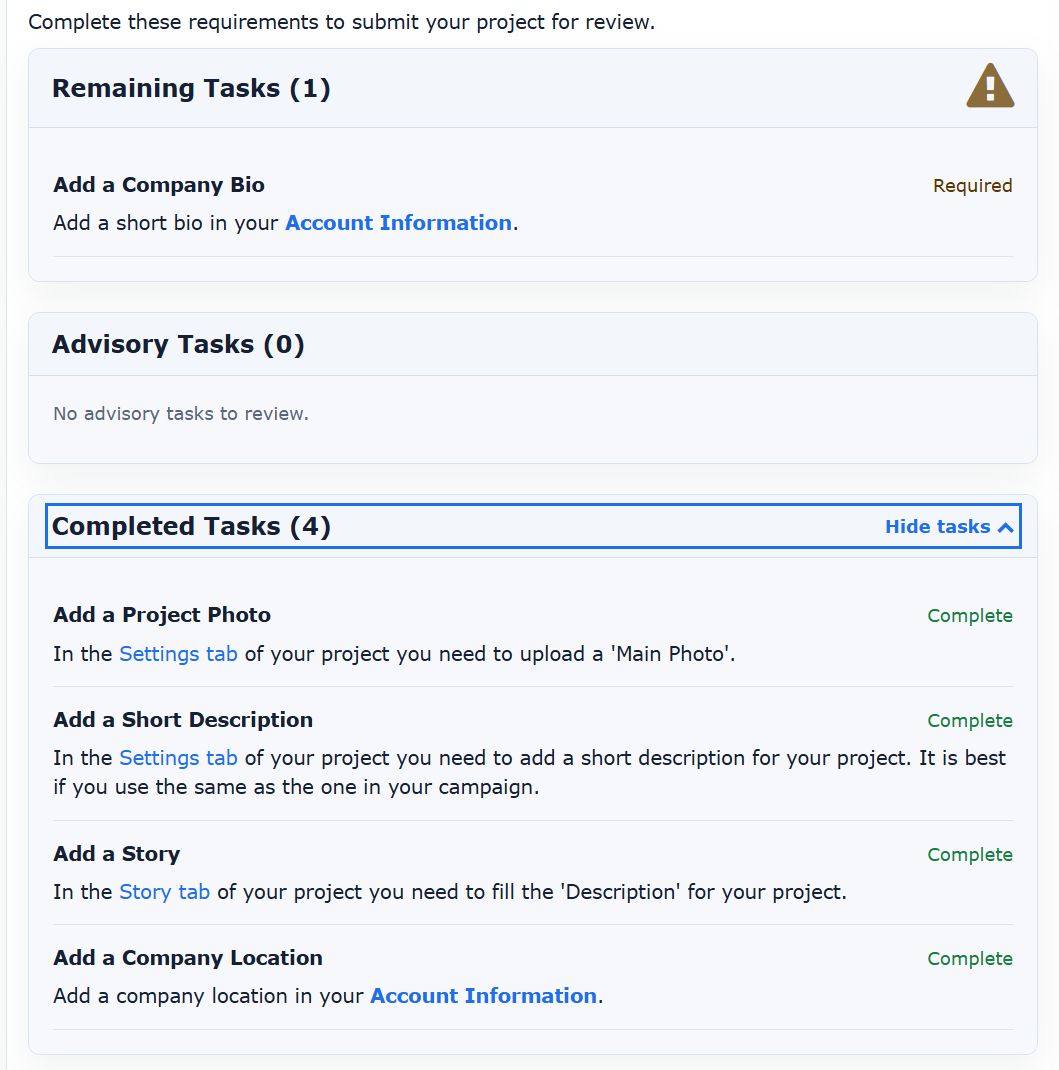
Once you've completed all the required information, click the "Submit for Review" button to move to the next status and submit your project for review by our Support Team.
Status: In Review
In this state your project is being reviewed by our team. This process may take up to 3 business days, so we do ask for your patience.
If the team decides that there is something wrong with your submission (maybe missing information), then your project will be rejected, an explanation will be given and you will have the option to submit it again for review once you made the necessary changes.
If everything is OK, your project will be approved and moved to the next status.
Status: Approved
At this stage, our team has reviewed and approved your project for our platform. You now have the green light to continue advancing your project to the next steps whenever you're ready.
While our platform performs basic validations to catch technical mistakes, it's essential to note that thorough testing on your end is still very crucial. You need to ensure that everything functions exactly as you want before advancing.

To test, use the blue "Preview" buttons embedded within each presentation of the next steps. Clicking this button takes you to your project's page, not as seen live by visitors, but as it will appear once you advance your project to that stage. This preview mode enables you to test all functionalities before making them accessible to your backers.
Take the time to conduct comprehensive testing covering all possible combinations, as once you advance your project, you cannot undo the advancement and come back to the previous state.
Thorough testing beforehand ensures a smooth and error-free experience for your backers.
Status: Pre-Campaign
1. Landing Page in Hive vs Kickstarter
Since August 2024, Kickstarter implemented a new set of functionality that allows you to add more content in the "Coming Soon" page of your project in the Kickstarter platform.
This raises the question: When I run pre-campaign budget, should I direct the potential customers to the KS page or to Hive's landing page?
To answer this we first need to see the differences between the two options:
- In Kickstarter, if the user already has a KS account, then they will only need to click the button "Notify Me" and they are done. If they do not have an account they will have to create one before being able to become a follower of your project.
In addition, a KS follower will be notified via email and push notification in their mobile app (if they have it), when your project launches and in the last 48 hours of your campaign. Other than that (when this article was being written) you do not have any access to any information about your followers. - In Hive, the user when they click the "Follow" button, they will be prompted to add their email. This email will be added in the "followers" tab of your project, you will have access to it (you can export them in CSV). Hive does not require anything else from them (no need for an existing account). When they register, they will also be redirected to your Kickstarter landing page so that they can follow there too, and they will receive an email immediately confirming their registration and also reminding them to visit the Kickstarter landing page to follow there too.
Both platforms (Hive & KS) allow you to add Google and Facebook Pixels, so you can create a funnel and track customers from Ad Click and through all the steps!
As you can understand, using the Hive's landing page, you can get the benefits of both platforms!
2. Requirements
To advance to this stage you only need to fill a photo, a story and a campaign URL for your project. You do not need pledge or add-on information.
When you advance your project to this stage, it becomes publicly visible on our platform, appearing on our homepage with a "Coming soon" flag. Visitors can click on your project to view the main photo and the content of your "Story." This feature enables you to create a landing/teaser page for your project, providing information before your Kickstarter campaign officially begins.
If your project is already approved by Kickstarter, you can include the Kickstarter URL in the "Basics" settings of your project. This action generates a "Follow" button on your project's page within Hive, prompting visitors to follow your project.
When a visitor clicks the "Follow" button, the following actions occur:
- A popup appears, prompting them to provide their email. Collected emails are added to your "Followers" list within your project.
- After submitting their email, the visitor is redirected to your Kickstarter project page, encouraging them to follow there as well.
This process serves multiple purposes:
- It allows you to present more detailed information about your project on a customizable landing/teaser page, offering a richer experience compared to Kickstarter's pre-launch information.
- By providing additional project details, you increase the likelihood that visitors who decide to follow your project will also become backers. This helps assess the quality of followers acquired during the pre-campaign marketing phase.
- With one page and one action, you can simultaneously build an email list and increase followers on your Kickstarter project, streamlining your pre-launch marketing efforts.
- You can also publish updates to your project in Hive, and all followers will be automatically notified via email. This is a great way to keep your followers engaged and captivated about your upcoming campaign.
3. VIP Rewards
You can create special rewards (pledges) that are available "Only During Pre-Campaign". If you do so, these rewards will be visible on your project page in Hive, and visitors will have the option to purchase them.
When a visitor selects one of these rewards and completes the checkout process, the following occurs:
- They are added to the "Followers" list of your project, where you can view the reward they selected (if there are multiple options) and the amount they paid.
- The payment will be processed through PayPal, and the funds will go directly into your PayPal account. Hive does not charge any fees for this transaction—only PayPal’s standard processing fees will apply.
Best Practices
One effective pre-campaign strategy is to set up your project’s pre-campaign page on Hive in a way that encourages visitors to register for your newsletter and "Become VIP" by making a small contribution (usually $1 or $2).
VIPs have been shown to have a significantly higher conversion rate to backers when the campaign launches, compared to those who only provide their email. This process allows you to refine your offer, presentation, and strategy during the pre-campaign phase to attract as many VIPs as possible. The best strategy for acquiring VIPs is likely to be the most successful during your actual campaign!
Many creators offer special rewards to VIPs, such as:
- Exclusive items that cannot be purchased unless you are a VIP.
- Discounted items: For example, a $10 add-on that is offered to VIPs for just $1 or $2.
- Early Bird Reservation: Since you have the list of VIPs, you can offer them "Early Bird" access even if they miss the first few hours of your campaign. You can let VIPs "reserve" the Early Bird offer, ensuring they receive the same bonuses as Early Bird backers, even if they pledge later in the campaign.
Status: Campaign Ongoing
Requirements: You do not need anything extra to Advance your project to this state.
Your project should be in this status while your campaign is live.
During this stage, your project's page in Hive will showcase the contents of the "Story," and it will provide a link directing potential visitors straight to your Kickstarter campaign's page.
This ensures that interested individuals can easily access your campaign and participate while allowing you to utilize Hive's features to enhance your project's performance.
Status: Late Pledging
What is Late Pledging
This is a temporary stage for your project, bridging the gap between the end of your Kickstarter campaign and the full readiness to open the pledge manager for backers to finalize their pledges.
During this stage, our platform does not charge shipping and/or taxes, and backers do not have the option to select add-ons. The primary activity at this point is allowing new (late pledge) backers to join your campaign by selecting one of the available pledges and paying only its base amount.
All new backers added during this stage are incorporated into your project. When you have completed the configuration of your pledge manager and are ready for everyone to complete their pledges (including paying shipping costs and finalizing add-on selections), these backers will receive an email invitation, similar to your Kickstarter backers.
This interim stage provides you with valuable time to obtain the final weight and sizes of your rewards from your manufacturer. It also allows you to collaborate with your fulfillment partners to determine the best shipping solution. Ensuring accurate information is crucial when you eventually start charging shipping costs to avoid any losses due to incorrect predictions and cost estimates.
Requirements
You only need the basic information of your pledges to advance in this stage. This includes a caption, a description, a photo, the price and the delivery date. You do not need shipping costs, you do not need add-ons information.
You also need to mark each pledge that you wish to use during this stage as visible in "Late Pledge Landing Page".
How to correctly set your Kickstarter Page
You should be ready with your Hive's project at "Late Pledging" state BEFORE your campaign is over. About an hour before is a good time.
Once your Kickstarter campaign is finished, if you will be using for a period of time Kickstsarter's Late Pledging system, then there is nothing more you need to do for now.
If you are ready to stop late pledging on Kickstarter and switch to Hive, then first make sure Late Pledges in KS are stopped. Then visit your Kickstarter project's main page and create a button with the caption "Late Pledge", and use as URL your project's page in Hive.

Please be careful! Unfortunately, Kickstarter's User Interface is a little complicated and confusing at this point. You will need to save TWICE for the button and the URL to be operational.
First, after you put the caption and the URL, click the check icon at the right of the button.
Then, you must click the green "Publish" button at the top right of the screen. If you do not press that, your changes will NOT be saved!
To make sure that everything works as expected, we recommend you visiting your Kikcstarter campaign page on a separate tab without being logged in to your Kickstarter account, better yet if you use a different browser, and verify that the button is visible AND takes you to the right page in Hive.
Handling "Dropped/Errored Backers"
After the end of your campaign, Kickstarter will fail to charge some of your backers' Credit Cards. You can still save some of them by simply sending a Private Message (through Kickstarter) to all those backers, informing them to come to Hive and pay using Paypal.
In Hive a backer can choose to pay using Paypal, which opens up a lot of other payment options (Bank Account Transfers, local European processors, Debit Cards), even paying in installments using Klarna!
You should send them a message BEFORE the end of the first week after your campaign finishes, to try and convert some as soon as possible, even via Kickstarter.
Here is a template message you can use to send them:
We saw that your payment has not yet gone through.
To fix this issue, visit the campaign's page using your Browser (not on the Mobile App). At the top you will see a red message informing you of the problem with a button labeled "Fix payment". You can click there to go to a page and update your Credit Card.
Alternatively, in the same page, under the "You backed this Project." title, you will find a link with the caption "View Pledge". By clicking this, a popup will show you the information of your pledge, informing you of the problem.
If you can not resolve this issue, and you do not want to lose your pledge, send us a message and we will give you an option to pay via Paypal (through our Pledge Manager). If you have already done this, please ignore this message.
For any questions you may have, or if you need assistance, do not hesitate to send us a private message.
Thank you very much for your support!
If someone requests to pay you via Paypal, then simply direct them to your project's page in Hive. There they will be able to pay via Paypal, and keep their pledge!
Late Pledging in Hive vs Kickstarter
In June 2024, Kickstarter introduced a late pledging feature for the first time on their platform. This allows you to designate certain rewards for late pledging, enabling you to continue raising funds on Kickstarter.
To maximize the success of your project, we recommend utilizing a combination of Kickstarter and Hive's late pledging features.
First, ensure that Hive is fully set up for late pledging before your campaign ends, and switch to "Late Pledging" mode as soon as your campaign concludes. This approach provides an alternative for "errored" backers who are unable to complete their payments with a credit card. Simply instruct them to visit your project's page on Hive and use PayPal to fulfill their pledge, ensuring they don't miss out on any Kickstarter exclusives and bonuses.
During the first week after your campaign ends, we recommend keeping both Kickstarter and Hive's late pledging features operational. At the end of the week, Kickstarter will change the status of "errored" backers to "dropped." At that point, you can export the backer list and import it into Hive, following the instructions in the remainder of this section to transition from Kickstarter to our platform.
Additionally, please note that Kickstarter charges a fee of 5%, whereas our fee is either 3% or 4%, depending on your service package.
Status: PM Open
1. Requirements
To advance to this stage you will need to have completed everything else that is required for the system to be able to accurately display all the choices to the backers, calculate shipping costs and have them finalize their pledge. This includes: Rewards definitions, setting a deadline for the pledge manager, figure out the shipping costs for your project, assigning a fully configured shipping method, and have proper terms & conditions and company information set to your account.

The only thing that you do not need to resolve before opening your pledge manager is the "Apple Id Emails" issue. You still need to follow the instructions and do something about it, but this will not delay the launching of your pledge manager. You can read more about this issue in this article.
2. Configuring Rewards (Pledges/ Addons)
Having the right configuration for your rewards (pledges/add-ons) is crucial to ensure that data from Kickstarter transfers correctly to our platform. It also helps make your backers' checkout experience seamless and boosts your upsell opportunities.
Equally important, proper configuration ensures you receive the right data to successfully complete your fulfillment process.
Every project is unique, and each creator has different needs. Our platform offers a variety of customization options to help you tailor it to your specific requirements. For more details on how to configure your rewards, please read this article.
3. Importing Backers from Kickstarter
You need to first upload all your backers from Kickstarter. Please go to the "Backer Report" page of your Kicsktarter project, and download your backers in CSV format. Then go to the project's "Backers" tab in Hive, and follow the on screen instructions on how to upload it.
Read more detailed instructions about this process in this article.
4. Testing
When you advance your project to "PM Open" the system does not automatically send out invitations. You will need to press the button "Send Invitations" when you are ready, to do so.
Before sending out email invitations to all your backers to come and complete their pledge manager, we intentionally allow you one final chance to thoroughly test the process. This enables you to use a clean, new account and go through the system as a regular new backer, providing valuable insights.
Read more detailed instructions about this process in this article.
Perform a Smoke Test
Before you send the invitations to ALL your backers, you can open manually some selected few backers, and send them the invitation. Only those backers will receive the email and they will be able to access the PM and complete their pledge.
To do so, simply find the backer in the "Backers" tab of your project, open their information popup and click the button "Resend PM Invite".
This will helps you do a final controlled test to a small handful of recipients, to weed out any remaining issues before opening it to the public.
Please take the time to conduct one more set of tests to ensure everything is in order. If any issues arise, don't hesitate to contact us for assistance.
5. Sending out Invitations
Once you've completed testing and are satisfied with the results, proceed to the "Overview" tab of your project and click the "Send Invitations" button. This will initiate the process of sending email invitations to all your backers.
Keep in mind that our system sends 150 emails every 15 minutes deliberately. This cautious approach allows for immediate support if any issues arise as backers start completing the pledge manager. If you encounter any problems at this stage, reach out to our support team promptly for assistance.
You should also consider posting an Update in your Kickstarter project notifying your backers that the Pledge Manager is Open.
While the pledge manager is in status "PM Open", your existing backers can access their pledge, make adjustments and finalize it, while new backers can still late pledge.
6. Pledge Finalization and Late Pledging
While your pledge manager is in this state, your backers can make any desired changes to their pledges. Even "Verified" backers have the option to revisit their pledges, click the "Re-open Pledge" button, and make modifications.
Also, any new potential backers that missed your campaign, can still late pledge and be a part of it.
Status: PM Closed (Soft)
Moving your project to "PM Close (Soft)" status triggers several actions:
- Verified Backers: They can no longer make changes to their pledges using the "Re-open" button. If they require any adjustments, they must open a ticket and request you to make the changes.
- Open Backers: They can still access the pledge manager and complete their pledges.
- Late Pledge: New backers can still join the campaign.
- Reminders: Our system ceases to send out reminders to Open backers during this stage.
- Payout: You can now request the balance of your project to be send to you (via Paypal or Bank Wire Transfer). When you are ready, follow the on screen instructions to fill in any information we may be missing for the wire transfer, and then make a formal request from within the "Balance" tab of your project. Please note that it takes anywhere between 1 to 5 business days for such a transaction to be processed. Also, there is always a wire transfer fee associated with each payout request. It is better to try to minimize your requests.
Consider this a temporary "Closed" state, intended to encourage final backers who have not yet completed their pledges to do so. Many backers wait until the last minute to finalize their pledge manager, and this serves as a gentle reminder. It acts as a way to announce that the pledge manager is "Closed," while silently allowing a bit of extension for those who may have overlooked the deadline.
Here is a template private message for your reference. You can tweak it to fit your needs:
Hi,
we noticed that you have not completed your pledge manager yet. Please complete the process to give us the shipping information so that we can deliver the game to you.
Deadline for the Pledge Manager's completion is on Monday 11th of April, 2024. After that date your game will not be included in our mass shipping process, and if the game is still available you will not have the same shipping costs/fees. If a month passes after the end of the campaign fulfillment and you still have not communicated with us, then you forfeit your pledge.
You access your pledge in our Pledge Manager using the URL below and following the onscreen instructions:
https://www.hiveinteractive.net/pledgemanager/
Let us know if you require any help, or you have any questions.
Thank you very much for your support!
You should also consider making an update with a title like "Last call to complete your Pledge Manager", or "Pledge Manager is closing in 7 days!" etc.
When you are ready to fully close the pledge manager, you can advance to the next stage.
Batch Fulfillment
If you need to fulfill your backers in batches (for example you want to send now the ones that paid premium to get it first and a month earlier than the rest, and then ship the rest later), then our system can help you manage this process with the right rools.
Read more about the full process in this article.
Status: PM Closed (Hard)
When you move your project to this stage, several important changes occur:
- Backer Status: All "Open" backers are reverted to "Closed." For a detailed understanding of what each status means, you can refer to the relevant section for more information.
- New Backers: No new backers can join your campaign from this point onward.
- Pledge Changes: From this stage onward, nobody can make any changes to their pledge directly. If backers require adjustments, they must open a Support Ticket and request you to apply any changes.
- Fulfillment Preparation: At this point, it is safe to create your Fulfillment exports and obtain backer information. This enables you to make arrangements for freight and shipping, moving forward with the fulfillment phase of your project.
- Payout: You can now request the balance of your project to be send to you (via Paypal or Bank Wire Transfer). When you are ready, follow the on screen instructions to fill in any information we may be missing for the wire transfer, and then make a formal request from within the "Balance" tab of your project. Please note that it takes anywhere between 1 to 5 business days for such a transaction to be processed.
Closed Backers with Hive Payment
Once you switch your project to "PM Closed (Hard)", you should check your backer list for any backers that are "Closed (With Hive Payment)". There is a relevant filter in the "Backers" tab of your project.
There is a chance you will find backers that although they are "Closed", they have fully paid their shipping costs and taxes, and they have a balance of zero.
Those are the backers that at some point re-opened their pledge, made no changes, ignored all the warnings and never completed the process again to become "Verified". You need to open each one of them and manually verify that they actually do not owe you any balance. If that's the case then you should switch them to "Verified" so that they are included in the fulfillment export reports.
Late Backers
At this stage you may still have some backers (who never completed their pledge manager) come to you and ask you to help them out. Also, there may be some backers that want to apply a change to their pledge (e.g. add an add-on they forgot).
The best way to handle those cases is to re-open their pledge and then let them apply any changes in their pledge they may want. You can re-open their pledge by finding their record in the "Backers" tab of your project and clicking the "Change Status" button.

It is always better to let the backers make changes rather than doing them yourself. That way an electronic audit trail is kept for each change, which will be very helpful during any disputes in the future.
Status: Completed
The "Completed" status is not one that you can manually advance your project to. Instead, your project automatically transitions to this status after you have requested the final revenue balance to be sent to you, and we have completed that transaction.
Once in this status, you still retain access to your project's information and backers' data, but you are no longer able to apply any changes to it. This marks the conclusion of the active phase of your project, and you now have a view-only access to the project details and backer data.